
Many government applications, gram panchayat letters, school notices and village announcements in Maharashtra are written in Marathi. But most phones and computers have only an English keyboard, and very few people know the old Marathi typing layouts. As a result, people write Marathi in English letters ("Manniya Sarpanch saheb...") which looks unprofessional, or they pay someone to type.
This guide shows how to type in Marathi using an English keyboard for free. You will learn how phonetic typing works, how to type tricky letters, and how to copy the Marathi text into forms, Word files and WhatsApp.
Quick Answer: Open a free Marathi typing tool, type the Marathi words using English letters as they sound (for example "maajhe naav"), and the tool converts them to Marathi script (माझे नाव). Choose the right suggestion when needed, then copy the Unicode text and paste it anywhere.

What Is Phonetic (Transliteration) Typing?
Phonetic typing means you type a word the way it sounds, using English letters, and the software converts it into the Marathi script. You do not need to learn a new keyboard layout. For example:
| You type | You get |
|---|---|
| maajhe naav | माझे नाव |
| namaskar | नमस्कार |
| gram panchayat | ग्राम पंचायत |
| arj | अर्ज |
| dhanyavaad | धन्यवाद |
The output is Unicode Marathi, which works in browsers, WhatsApp, email, Word, Google Docs and government portals that accept Marathi.
Type in Marathi Using an English Keyboard with Our Free Tool
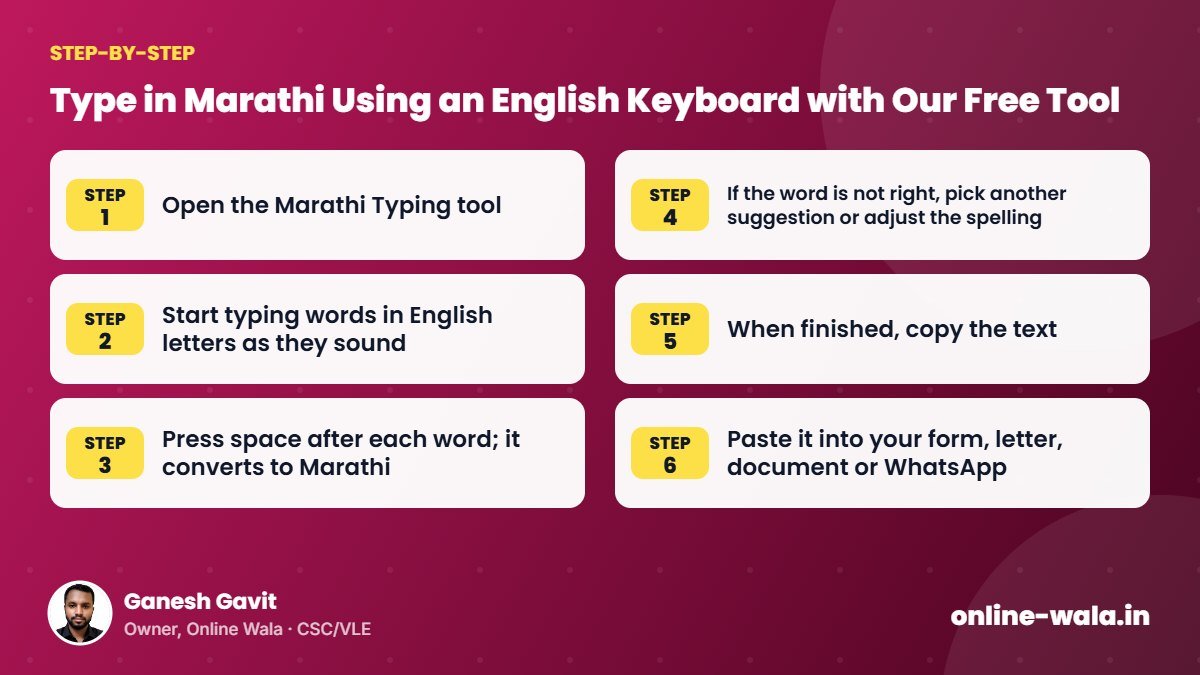
Our free tool to type in Marathi using an English keyboard works on mobile and computer:
- Open the Marathi Typing tool.
- Start typing words in English letters as they sound.
- Press space after each word; it converts to Marathi.
- If the word is not right, pick another suggestion or adjust the spelling.
- When finished, copy the text.
- Paste it into your form, letter, document or WhatsApp.
Tips for Typing Tricky Marathi Letters
Different tools use slightly different rules, but these patterns are common in phonetic typing:
- Long vowels: Double the vowel – "aa" for आ, "ee" or "ii" for ई, "oo" or "uu" for ऊ.
- Aspirated sounds: Add "h" – "kh" for ख, "gh" for घ, "chh" for छ, "th" for थ, "dh" for ध, "bh" for भ.
- Retroflex letters: Capital letters often help – "T" for ट, "D" for ड, "N" for ण, "L" for ळ.
- श and ष: "sh" usually gives श; "Sh" may give ष.
- ज्ञ: Often typed as "dny" or "gy" – for example "dnyaan" for ज्ञान.
- Anusvar (ं): Typing "n" or "M" before a consonant usually gives the dot – "pancha" → पंच.
If a word does not come out right, try a slightly different spelling. After a few minutes of practice, most people type quickly.
Where Can You Use Marathi Typing?
- Applications to the gram panchayat, tehsil office or school
- Self declarations and affidavits in Marathi
- Marathi biodata
- WhatsApp messages and group notices
- Village programme invitations and banners
- Social media posts and blogs in Marathi
- Online forms that accept Marathi names and addresses
Unicode vs Old Marathi Fonts
| Point | Unicode Marathi | Old legacy fonts |
|---|---|---|
| Works on WhatsApp and web | Yes | No – shows English gibberish |
| Searchable on Google | Yes | No |
| Accepted by online portals | Usually yes | Usually no |
| Needs special font installed | No | Yes |
Unicode is the modern standard, and Maharashtra government offices have been encouraging the use of Unicode Marathi. If you receive an old-font document, retyping it in Unicode makes it usable everywhere.
Common Mistakes
- Writing Marathi in English letters in official letters – it looks careless.
- Not checking spellings of names. Names may have special spellings; confirm with the person.
- Mixing fonts – pasting Unicode text into a document set to an old Marathi font can show strange characters. Use a Unicode font like Mangal or Noto Sans Devanagari.
- Ignoring punctuation: Use the full stop (.) as is common in modern Marathi; the danda (।) is also used in some writing.
Tips for CSC and VLE Operators
- Offer Marathi application typing as a service – it is in demand in every village.
- Keep templates for common applications and update them in Unicode.
- Read the final text aloud to the customer to catch mistakes.
- For declarations, use our Swayamghoshana Patra maker, which already has Marathi formats.
- For biodata, use the Biodata Maker with Marathi details.
Real Example from Our CSC Centre
A gram panchayat member wanted a notice in Marathi about a Gram Sabha meeting to share on the village WhatsApp group. He had written it on paper. Using phonetic typing, we typed it in a few minutes, checked the spellings of names and the date, and copied it into WhatsApp. Since it was Unicode, everyone could read it on their phones, and we also printed it for the notice board.
Using Marathi Typing on Your Phone Keyboard
Many phone keyboards also support Marathi transliteration. In keyboard settings, add the Marathi language and choose the option to type in English letters and get Marathi suggestions. This is handy for chat. For longer letters and applications, an online typing tool on a bigger screen is often easier to edit and copy.
Common Words and How to Type Them
| Type | Marathi | Meaning |
|---|---|---|
| arjdaar | अर्जदार | Applicant |
| vishay | विषय | Subject |
| prati | प्रति | To |
| gaav | गाव | Village |
| taalukaa | तालुका | Taluka |
| jillhaa | जिल्हा | District |
| aaplaa vishvaasu | आपला विश्वासू | Yours faithfully |
Exact output may vary slightly between tools; if a word comes out differently, adjust the spelling or pick from suggestions.
Format of a Simple Marathi Application
- प्रति – the officer's designation and office address
- विषय – one line describing the request
- महोदय / महोदया – salutation
- Body – two or three short paragraphs explaining the request clearly
- Closing – आपला विश्वासू / आपली विश्वासू
- Name, signature, address, mobile number and date
Type the application with phonetic typing, paste it into a document with a Unicode font, check the spellings once more and print. Keep the soft copy so you can reuse the format for future applications.
Practice Makes It Fast
For the first few days, phonetic typing may feel slow because you are learning which English spellings give which Marathi letters. Practise by typing short WhatsApp messages in Marathi. Within a week, most people can type a full application in a few minutes without looking for help.
Checking Marathi Text Before You Send It
Phonetic tools are smart, but they cannot know every name or local word. Before you send or print, read the full text slowly once. Look for three things: names of people and villages, numbers and dates, and words with half letters (जोडाक्षर) such as क्ष, त्र, ज्ञ and श्र. If something looks wrong, place the cursor on the word and retype it with a slightly different spelling. For official letters, ask the person to read the final printout before signing.
Frequently Asked Questions
How can I type Marathi using an English keyboard?
Use a phonetic Marathi typing tool. Type words as they sound in English letters and they convert into Marathi script.
Is online Marathi typing free?
Yes. Our Marathi Typing tool is free and works in the browser without login.
Can I paste the Marathi text into WhatsApp and Word?
Yes. The text is Unicode, so it works in WhatsApp, Word, Google Docs, email and most websites.
How do I type ळ, ण or ज्ञ?
Phonetic tools usually use capital letters for retroflex sounds (L for ळ, N for ण) and "dny" for ज्ञ. Try variations if needed.
What is Unicode Marathi?
It is the standard way of storing Marathi text so it displays correctly on all modern devices without special fonts.
Why does my Marathi text show strange symbols?
The document may be using an old non-Unicode font. Change the font to a Unicode font like Mangal or Noto Sans Devanagari.
Can I type Hindi with the same method?
Both use the Devanagari script, so many words appear the same, but spellings and words differ. Use a Hindi-specific tool for Hindi text.
Conclusion
You do not need to learn a new keyboard to write good Marathi. Type the way you speak, check the spellings, and copy the Unicode text wherever you need it. Try our free tool to type in Marathi using an English keyboard for your next application, letter or message.
Online Wala is not affiliated with any government department.

Ganesh Gavit
Owner, Online WalaFounder of Ganesha Digital. Creates software, apps and ready-to-use templates for businesses, students and CSC/VLE operators.